

Business Analyst Case Study
Working on a Project from Scratch (Task Manager Mobile App)
The Task Manager App is a project to develop a mobile application for task management. Our work on this projected included helping members learn with hands on practice how to work on a project from scratch including eliciting requirements, defining the feature set, and translating Figma designs into user stories in Jira, while maintaining comprehensive documentation in Confluence.
App Design
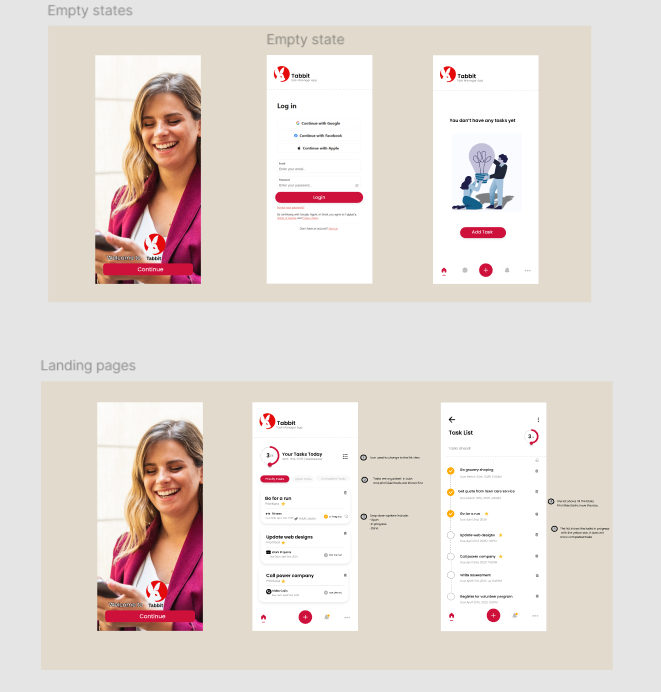
Session 1 – Understanding the project
In this session we discussed the details of this project and what the project needs to accomplish with the Task Manager app.
Video is only available to logged in club members. Want to watch? Sign up or upgrade
Session 2 – Preparing for Stakeholder Interviews
In this session we determined the questions Business Analyst should ask stakeholders in order to identify the needs of users. In this session that we also covered setting up the project in Jira.
Video is only available to logged in club members. Want to watch? Sign up or upgrade
Conducting Stakeholder Interviews
Interview 1
In this session we interview Priscilla to find out her needs when to comes to managing tasks.
Additional Stakeholder interviews conducted by club members are available in your club member’s BA Connect Drive.
Video is only available to logged in club members. Want to watch? Sign up or upgrade
Session 3 – Preparing for Stakeholder Interviews
In this session we discussed how to collate and categorize the responses from the stakeholder interviews in order to arrive at key requirements.
Video is only available to logged in club members. Want to watch? Sign up or upgrade
Session 4 – Determining the MVP feature set
In this session we identified the MVP scope of the project.
Video is only available to logged in club members. Want to watch? Sign up or upgrade
Session 5 – Walkthrough of the UI Designs
In this session we look at the UI designs and mock ups of the Task Manager mobile app and start creating the project in Jira. You will learn how a Business Analyst analyzes a design, how to do a walkthrough and what questions to ask.
Video is only available to logged in club members. Want to watch? Sign up or upgrade
Session 6 – Writing User Stories for the Task Manager App
In this session club members practice how to write user stories using the common tool of the trade Jira. This is a practical example of how to take a UI design and convert it to epics and user stories. This session helps you understand how to break down complex features into manageable user stories that can be estimated.
Video is only available to logged in club members. Want to watch? Sign up or upgrade
Session 7 – Review User Stories and Get Ready for Dev Hand Over
In this session club members get a master class in user Jira as a professional Business Analyst and practice how to hand over their user stories to the development team. This session includes ensuring the user stories are written to the right level of detail that can easily be estimated.
Video is only available to logged in club members. Want to watch? Sign up or upgrade
Session 8 – Walkthrough of Azure DevOps
In this session club members get a master class in user Azure DevOps and learn how to navigate and work in Azure DevOps as a Business Analyst.
Video is only available to logged in club members. Want to watch? Sign up or upgrade
Business Requirements Documentation for Task Manage App
At the end of the case study, club members were asked to practice their documentation skills to create a document that would leave behind for the rest of the team to have knowledge of what was built. This is an example of a Business Requirements documents written by club members and reviewed and approved by Karaleise.
BRD Document
See the Confluence page with BRD documentation here: https://karaleiseapp.atlassian.net/wiki/x/DYB7Cg